
Stream Deck
Open /streamdeck in the GUI to use the browser emulator, or install the physical Stream Deck + sidecar. Both surfaces show the same fleet state and provide the same agent controls.
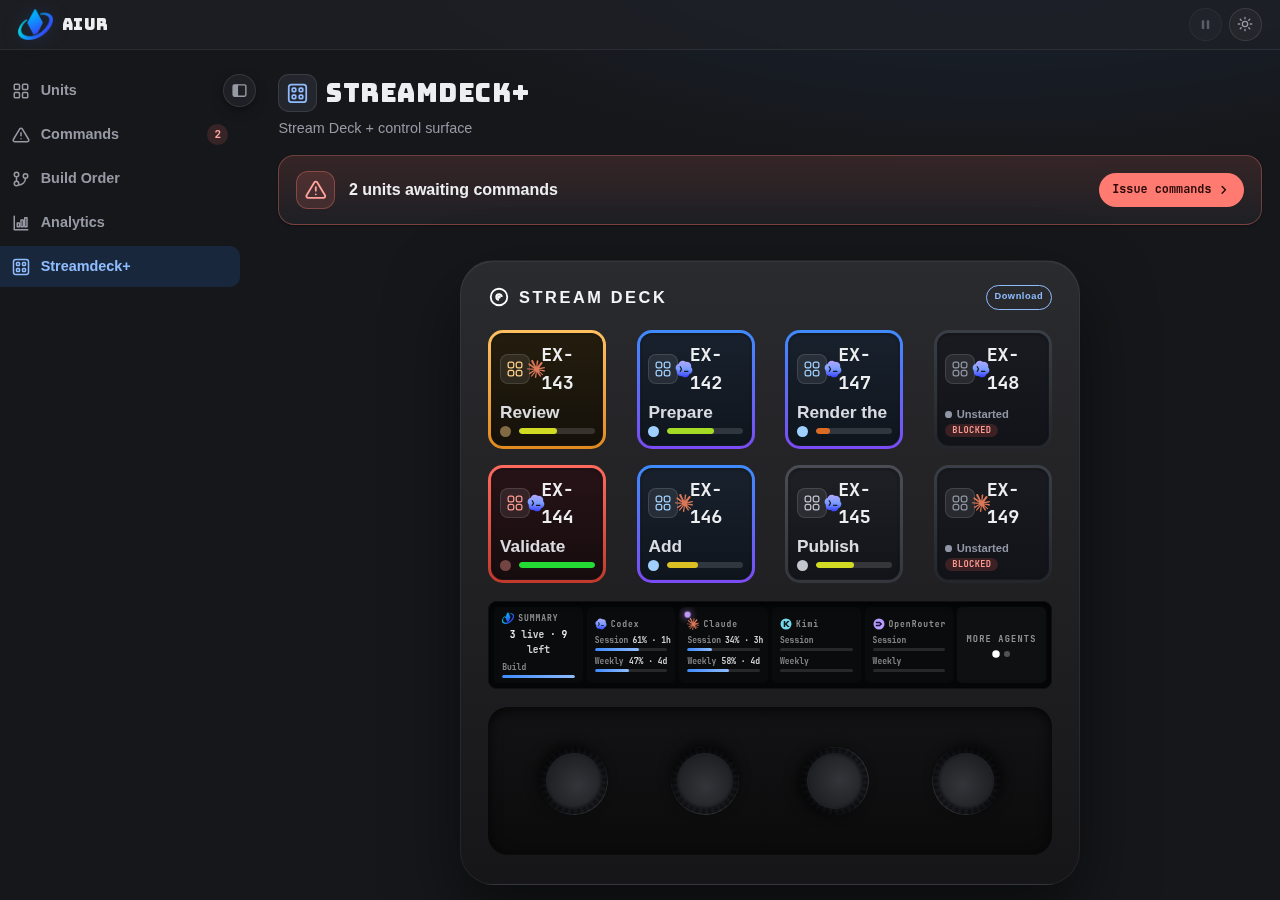
Drive the four modes
| Mode | Enter it | Keys | Touch strip | Dials A to D |
|---|---|---|---|---|
| Grid | Initial view | Up to eight agent keys | Fleet summary, provider meters, page | A: no action. B: scroll physical provider panel. C: no action. D: page agents; press for next window. |
| Command | Press an agent key | Pause/Play, Logs, Mic, Settings, Commands, plus Send and Cancel once dictation has text | Selected agent status and progress, or the voice panel while dictating | A: Grid. B/C: no action. D: press for Logs. |
| Settings | Press Settings in Command | One key per detected microphone, then TestMic and a paging key; text pane in the emulator | Selected microphone, or the voice panel while TestMic is held | A: Command. |
| Logs | Press Logs or dial D | Up to seven event keys plus LIVE | Five transcript rows | A: scroll transcript; press for Command. B/C: no action. D: scroll event keys. |
| Commands | Press Commands in Command | History keys; then option keys, Mic, and Approve/Cancel | Command question, reading, OPEN/ANSWERED status | A: back a view. D: page history or options; press to approve. |
| Control state | Behavior |
|---|---|
| Pause | The label reflects the selected agent's current state. |
| Read-only Dashboard | Pause and Mic are disabled; Logs and Settings stay available because they change what you see, not what the fleet does. |
| Mic | Mic is press-and-hold, not a click; capture stops on release, cancellation, or mode change. |
| Priority | There is no prioritize key; the microphone took the fourth slot. Priority stays a Dashboard control and shows on the deck as a star and in Grid ranking. |
Read the Logs surface
Logs runs from oldest at the far left to newest at the far right.
| Key | Meaning |
|---|---|
| Ticket opened | Leftmost origin; owns transcript lines before the first event. |
| Event key | One ticket event: progress, phase, comment, CI, PR, decision, or attention. |
| LIVE | Rightmost current view; uses the selected agent's lane, provider, ticket, and progress face. |
Transcript lines stay beneath the event active when they arrived; agent prose is not promoted into extra event keys.
Selection and live typing
| Action | Result |
|---|---|
| Press an event key | Activates it, scrolls to the event, and deactivates LIVE. |
| Press LIVE | Jumps to the newest transcript line. |
| Turn dial A | Scrolls the transcript and updates the active event key. |
| Enter Logs | Opens at LIVE. |
| New text while LIVE | Reveals the message as it arrives and follows the feed. |
| Scroll away from LIVE | Stops following so history stays still. |
Transcript styling
| Row | Display |
|---|---|
| Agent prose | Bright, without a label. |
| Tool call | Glyph gutter; muted after completion. |
| Shell command | $ prefix. |
| Operator message | Coloured bar. |
| File edit | Unified diff with tinted added and removed rows. |
Progress bars
| State | Meaning | Display |
|---|---|---|
| Fresh | Recent reading | Solid green bar, slightly brighter at 100%. |
| Unknown | No reading has ever arrived | Full-width flat grey bar and dot, distinct from measured progress. |
| 0% | A real zero reading | Short solid stub, so "just started" never looks like "no reading". |
A bar that drops to an empty track and back is a bug; report it.
How Grid chooses agent keys
| Rule | Order |
|---|---|
| State buckets | alert → stuck → running → paused → queued |
| Queued tickets | Dependency-ready before blocked. |
| Slot order | Column-major: 1/2, then 3/4, then 5/6, then 7/8. |
| Paging | Moves by columns so each pair stays together. |
The order is the same in the browser emulator and on the physical deck.
Physical sidecar status
The Linux x64 archive installs the sidecar, a systemd user service, and the udev rule required to access the device.
| Requirement | Value |
|---|---|
| Hardware | Stream Deck + |
| Session | Arch Linux graphical session with systemd/logind |
| Device access | Installed udev rule and users fallback ACL |
| Unsupported | Alpine/musl, ARM, and glibc older than 2.28 |
The supported deployment is Arch Linux on x64 glibc 2.28+.
The service applies STREAMDECK_BRIGHTNESS, reconnects after device hotplug, suspend, or a dashboard disconnect, and keeps the keys and touch strip current with the live fleet.
| Setting | Where |
|---|---|
AIUR_PHOENIX_URL | ~/.config/aiur/streamdeck.env |
AIUR_DASHBOARD_USERNAME | ~/.config/aiur/streamdeck.env |
AIUR_DASHBOARD_PASSWORD | ~/.config/aiur/streamdeck.env |
STREAMDECK_BRIGHTNESS | Sidecar environment |
The password mints the channel token and never enters the WebSocket URL.
The Stream Deck runbook covers installation, device access, pairing, and recovery.
Voice input
Voice input captures speech from a microphone attached to the sidecar machine, transcribes it to English text, and sends that text to the selected agent as an operator message.
The keys
Voice lives in the agent view, reached by pressing an agent key in Grid.
| Key | Slot | Behavior |
|---|---|---|
| Pause/Play | First | Pauses or resumes the selected agent. |
| Logs | Second | Opens the Logs surface. |
| Mic | Third | Press-and-hold; live only while held. |
| Settings | Fourth | Opens the microphone picker on the deck, or a text pane in the emulator; dial A backs out of either. |
| Commands | Fifth | Opens the agent's Command history; always present, so its absence can never be mistaken for "no Commands". |
| Send | Sixth, once dictation has text | Delivers the accumulated text to the agent. |
| Cancel | Seventh, once dictation has text | Discards the accumulated text. |
The emulator shows a text pane because the microphones are attached to the machine running the sidecar, which a browser tab cannot see.
Dictate to an agent
Select an agent in Grid, then hold Mic and speak.
| Step | What happens |
|---|---|
| Hold Mic | The touch strip becomes the voice panel: scrolling waveform, level bar, and text as it settles. |
| Release | Settled text stays; the in-flight phrase is dropped, so a half-heard word cannot be sent. |
| Hold again | Transcription accumulates across holds rather than replacing the previous phrase. |
| Send | Uses the same path as the Dashboard composer, so the message enters the agent transcript and its next turn. |
| Cancel | Discards the buffer and leaves you in the agent view. |
| Back out to Grid | Discards the buffer, so a message about one ticket never follows you into the next. |
Open Logs after sending to find your own message at the live end of the feed.
Choose a microphone
Settings lists the microphones attached to the sidecar's machine, six to a page.
| Control or state | Behavior |
|---|---|
| Microphone key | Selects that device; the selected key wears the same plate, rail, and chip that marks the active key in Logs. |
| Paging key | Eighth key; present when more than six devices are attached. |
| TestMic | Seventh key; hold it to see the voice panel without delivering anything to an agent. |
| Stored choice | ~/.config/aiur/streamdeck-mic.json; survives a sidecar restart. |
| Chosen device absent | Capture falls back to the first available device and keeps the stored preference. |
| No microphone at all | The pane says so rather than showing an empty grid. |
The waveform and level bar are computed on the sidecar, so they keep moving with no ElevenLabs key configured; the panel then shows the reason where the text would be.
Voice replies are out of scope
The deck transcribes and does not speak, so it needs only the Speech to Text and User permissions.
The Dashboard agent conversation uses the same server-held credential for interactive spoken replies when Text to Speech permission and elevenlabs.voice_id are configured.
Configure it
| Setting | Value |
|---|---|
| API key | ELEVENLABS_API_KEY in a private environment file. |
| Config reference | elevenlabs.api_key: $ELEVENLABS_API_KEY |
| Language | elevenlabs.language_code: eng |
| Required permissions | Speech to Text and User; see ElevenLabs. |
| Optional voice | elevenlabs.voice_id; enables Dashboard spoken replies when set. |
elevenlabs:
  api_key: $ELEVENLABS_API_KEY
  language_code: eng
  voice_id: null # optional; enables Dashboard spoken replies when set
Prefer the environment reference over a literal key. See Configuration for field defaults.
Availability and privacy
| State | What the operator can expect |
|---|---|
| Key configured | Held microphone audio goes to Aiur, then to ElevenLabs; returned text goes to the selected agent. |
| Key absent | Device selection, waveform, and level meters work; transcription does not; no audio leaves the machine. |
| Capture released | Audio capture stops; there is no always-on listener or wake word. |
| Transcript returned | Text stays in memory until sent or discarded; nothing writes it to disk. |
| Coding agent launched | ELEVENLABS_API_KEY is removed from its environment and never logged. |
The Units meter reads the ElevenLabs credit quota as percentage used and the amount due on the next invoice, not speech-to-text audio-minute spend; see ElevenLabs metering.
Without a key
The key is optional and its absence is not an error.
| Surface | Behavior with no key |
|---|---|
| Microphone selection, waveform, level meters | Keep working; the sidecar computes them locally. |
| Transcription | Unavailable, because there is nowhere to send audio. |
| Mic key | Explains itself with the connect-time reason Aiur has no ElevenLabs API key - transcription is off. |
Where your voice goes
This is the one part of Aiur that sends operator data to a third party.
Aiur holds the credential and Aiur performs the ElevenLabs call. The sidecar never sees the key.
| Step | Path a spoken word takes |
|---|---|
| 1 | The sidecar captures 16 kHz mono audio from the microphone on its own machine. |
| 2 | It sends that audio to Aiur over the same authenticated Stream Deck channel it uses for fleet state, not to any third party. |
| 3 | Aiur opens the ElevenLabs connection with the key from its own configuration and streams the audio on. |
| 4 | ElevenLabs returns text and Aiur pushes it back to the deck. |
| 5 | The sidecar corrects unambiguous mishearings of the coined name before display or delivery. |
| 6 | The finished message reaches the agent through the ordinary agent-message path. |
| Heard as | Result |
|---|---|
aeor, iyer, ayer, A, your | Corrected to Aiur. |
higher, iron, ire, IR | Left unchanged, rather than corrupting a real word or acronym. |
| Condition | Consequence |
|---|---|
| Key configured | Microphone audio reaches ElevenLabs and the transcribed text comes back; both leave your machine. |
| Key absent | No audio leaves your machine and no ElevenLabs connection is opened. |
| Mic released | Capture stops; there is no always-on listening and no wake word. |
| Waveform and level meter | Computed on the sidecar, so "is my microphone working" is answered locally; only transcribed text makes the trip. |
| Transcripts | Held in memory until sent or discarded; nothing writes them to disk. |
Key handling
ELEVENLABS_API_KEY is a secret and is treated as one.
| Rule | Why |
|---|---|
| Configured only in Aiur's own configuration | No sidecar environment file carries it; the sidecar is given no way to hold it. |
| Scrubbed from coding-agent environments | Every *_API_KEY variable is removed, so an agent cannot read it. |
| Never logged or attached to a failure reason | A connection failure is reported generically instead. |
Supported microphones
PipeWire and PulseAudio microphones are supported, including ALSA, USB, and Bluetooth devices. Output-monitor sources are not offered as microphones.
Answer agent Commands
The Commands key on the agent row opens the focused agent's Command history — past Commands newest-first, active ones highlighted — and is always present, so its absence can never be mistaken for "no Commands".
| Key | Meaning |
|---|---|
| Command key | One Command; an amber OPEN badge marks an answerable one, a muted ANSWERED badge a completed one. |
| Mic | Always present in an open Command's detail; press-and-hold to dictate. |
| Approve | Appears while dictated text is held; sending it is a deliberate second action. |
| Cancel | Appears while dictated text is held; discards it. |
Answer one Command
Press a Command key to enter its detail: the description paints the bottom panel and the options paint the key row, four to a page.
| Step | What happens |
|---|---|
| Press an option key | Reads that option's detail in the bottom panel. Selecting is reading, never committing. |
| Dial D | Pages the options (or the history, on the history view). |
| Press dial D | Approves the selected option — the deliberate second action that turns a read into an answer. |
| Hold Mic | Dictates a free-text response, shown building in the bottom panel. |
| Approve | Sends the spoken text as the answer; it takes precedence over any listed option ("none of the above"). |
| Cancel | Discards the spoken text. |
| Back (dial A) | Leaves the detail for history, then returns to the agent row. |
The Approve state is unmistakable: when an answer is armed the strip shows a green APPROVE label, the one strip element that commits a durable operator decision. Completed Commands are read-only — they show what was asked and what was decided, with no Approve affordance.
Attribution
An answer given on the deck is recorded with operator attribution (operator / streamdeck) — the same authoritative path as a Dashboard answer. It is never an Executor answer with an operator flavour in free text.
That is also what lets the deck answer human_required Commands an Executor cannot. Answers are only accepted for the agent currently focused on the deck.
Authority
A plugged-in deck is a permanently-authorized operator client — equivalent to a permanently logged-in browser. The 300-second channel-token expiry bounds the socket, not the device's standing authority: the sidecar stores the dashboard credentials and re-mints the token itself over HTTP Basic.
A plugged-in deck stays authorized for as long as it sits on the desk; it is not a device whose authority expires and must be re-granted. That is by design, and it is what lets the deck answer human_required and irreversible Commands — the floor constrains automation, not the operator.
The same property means a stolen or unattended deck carries full operator authority, so treat it like a logged-in session rather than a token that quietly lapses. Answers remain version-checked regardless: the deck answers the exact Command version it read, and a stale press is rejected as a conflict — never recorded as a second decision.
Aiur holds a streaming connection to ElevenLabs, so transcription results can appear while you are still speaking rather than after you release the key. If the selected microphone stops producing audio or disconnects, capture reports the problem instead of remaining in a false listening state.