
Units
A Unit is one agent run working one ticket while it is active, paused, or waiting.
What the Units page shows
The Units page is dashboard / and CLI aiur units.
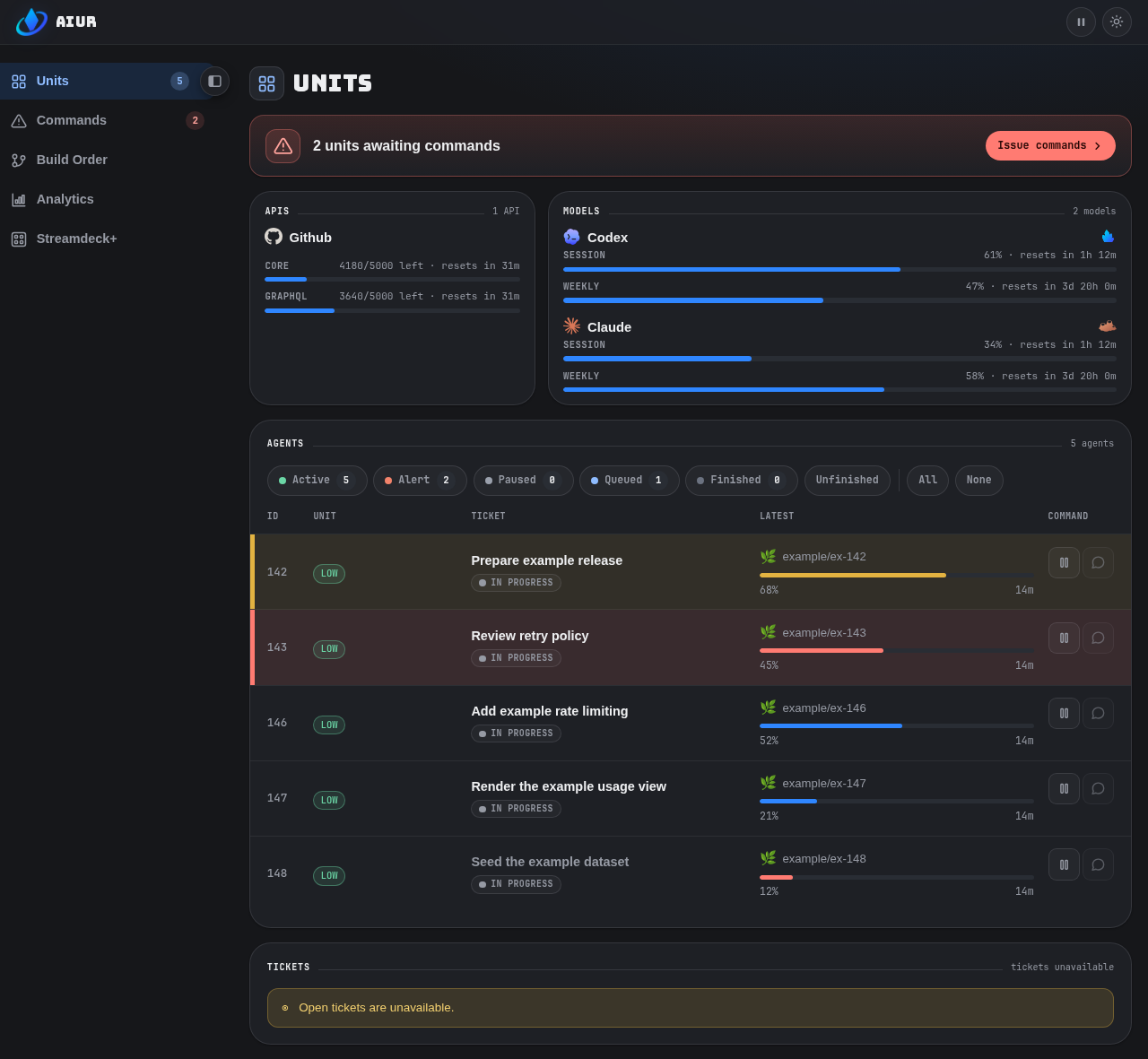
| Column or control | Meaning |
|---|---|
| State filters | Cumulative active, alert, paused, queued, and finished conditions. |
| Unit | Agent family, model, complexity, and priority tags for the selected routing. |
| Activity | Latest action and elapsed time. |
| Commands | Durable issues the Unit raised for the Executor. |
| CI and review | Current PR facts with safe links to the ticket, Command, or conversation. |
| CLI scope | `--scope live |
The Summary progress bar uses the daemon's weighted current-run aggregate across Units with current inputs. When that aggregate cannot be computed, the bar keeps its shape but renders as flat grey rather than as zero or a hatched track.
API meters
The Units strip shows non-model APIs beside model-provider meters.
| API | What the row means | Detail |
|---|---|---|
| GitHub Core | REST request budget percentage used | GitHub API budgets |
| GitHub GraphQL | Query-point budget percentage used | GitHub API budgets |
| GitHub secondary limit | Active abuse-control backoff | GitHub API budgets |
| ElevenLabs credit quota | Account credit pool as percentage used; appears only when a key is configured | ElevenLabs metering |
Every meter bar runs the full width of its pane, and every progress bar on the dashboard shares the same height. Model rows show the provider logo and usage bars only — the per-provider token count, spend figure, and the ElevenLabs next-invoice amount are not rendered on the strip.
A configured meter that cannot refresh names authorization, rate-limit, or connectivity failure without exposing its credential.
An ElevenLabs account with a zero character limit renders an empty track, because there is no denominator to state a percentage against.
Agent conversation and voice
Selecting an agent opens its live conversation without leaving Units.
| Control | Behavior |
|---|---|
| Composer | A writable dashboard sends typed text to the selected agent. |
| Microphone | Transcribes speech into the same composer when ElevenLabs speech-to-text is configured; the operator reviews the text and presses Send. |
| Waveform | Confirms the browser is receiving audio. |
| Spoken conversation | A separate half-duplex control: press, speak, press again; settled text is sent through the ordinary composer and enters the ticket transcript. |
| Spoken reply | Aiur streams ElevenLabs text-to-speech audio back to the browser when the agent replies. |
| Device selection | Browser-local and saved per dashboard origin, independent of the Stream Deck microphone preference. |
Dictation never sends a message automatically, and the browser never receives the API key.
Configure elevenlabs.voice_id and grant the key Text to Speech permission before using spoken conversation; voice cloning and barge-in are not part of this mode.
| Browser requirement | Result |
|---|---|
| Secure context | localhost qualifies; a plain-HTTP LAN address does not. |
| Remote access | Use HTTPS through a trusted private proxy. |
| Insecure origin or unsupported browser | The control is disabled with an explanation. |
| Permission denied | Explained beside the control, which stays available for a retry after a site-permission change. |
Usage and cost
Muse allowance meters show the current and weekly windows reported by its native CLI. These are observations from a live local host, labeled account unverified; they are not account bindings or admission evidence.
The dashboard renders the observation age and marks retained readings Stale after a failed refresh or when they age out; readings disappear when their host is retired. Missing readings remain unknown, while percentages above 100% retain their reported value (the visual bar stops at 100%).
Token usage and context capacity are separate from these allowance windows; missing capacity or pricing is not treated as zero.
The authenticated Usage and cost summary follows Tokens by model with Cost by provider route.
| Route case | How it reads |
|---|---|
| Routed call | Names both hops, such as OpenRouter -> DeepSeek. |
| Direct provider | Appears without an arrow. |
| Unreported upstream | Reads OpenRouter -> upstream unknown. |
| Unavailable estimate | Reads Unknown, never zero. |
mix aiur.cost_report --json | Keeps provider and upstream_provider as separate fields. |
mix aiur.pricing_window | Shows which peak/off-peak pricing window is currently in force, the next boundary, and how avoid_peak_pricing routing treats it. |
Provider-reported and API-equivalent estimates stay separate. Peak/off-peak windowed providers (DeepSeek) price a call at the rate actually in force; when the window cannot be determined, the conservative peak rate is reported.
Tickets
The Tickets panel covers every open repository ticket, including work that has not been routed to an agent.
| Surface | Behavior |
|---|---|
| Fleet table | Shows tickets carrying active agent:* labels. |
| Tickets panel | Shows identifier, title, and labels for the entire open backlog. |
| Ticket row | Opens ticket detail. |
| Robot action | Opens an editable routing preview for agent, model, effort, and complexity. |
| Confirm add-agent | Saves selected routing overrides asynchronously, adding the first active-state label only when no lifecycle state exists. The dialog closes after successful writes and reports dispatch authorization separately from scheduler admission. |
| Check admission | Rechecks an already labelled ticket without rewriting its labels. Authorization can still decline; an allowed GitHub operator must remove and reapply the trigger label using their own account. |
| Non-GitHub tracker | Reports the panel as unsupported. |
While the request runs, duplicate submission is disabled and Close stays responsive. Partial failures retain applied changes and retry only the remaining label changes. Successful label writes do not prove an agent is running: pause, prewarm, capacity, and dependency gates can still hold dispatch. See GitHub trust.
Reveal and search
| Control | Behavior |
|---|---|
| Initial reveal | Shows five tickets and keeps the full count in the header. |
| Show more tickets | Adds the next batch without moving existing rows; disappears when complete. |
| Search terms | Match identifier, title, or a bounded description excerpt in any order. |
| Matching | Ignores case and punctuation; accepts prefixes and one typo. |
| Ranking | Title hits rank above description hits. |
| Scope | Searches the whole backlog, including unrevealed rows. |
| Empty result | States that nothing matched; clearing restores the full list. |
Why Units matter
Paused, blocked, and alert rows make the reason stalled work is not advancing visible without opening a log.